The Trading Floor — Tab 1 of 9
Team Pulse
Live desk command center
When markets are open, Team Pulse is where the desk lives. Real-time marks refresh on the live blotter, the activity feed streams team actions, and seven sub-tabs — exposure, watchers, leaderboard, allocation preview, stress test, and correlation — keep risk visible without leaving the floor.
What it covers
Team Pulse is part of the same Trading Floor sidebar — one desk context from pulse to planning to attribution, without switching tools.
- →Live team P&L banner and watchlist ticker
- →Realtime activity feed from team_activity_log
- →Buying power and capital usage context
- →Quick actions: claim watcher, emergency pause, request capital
- →Command palette (⌘K) for floor navigation
Key capabilities
- Live Blotter with ~5s price refresh and liquidation distance
- Exposure cards with concentration warnings above ~30%
- Watcher claims and hand-off checklists on open trades
- Session leaderboard ranked by R-based P&L
- Stress test and correlation heatmap on the current book
What your desk gets
- Single operational view when the desk is trading
- Clear ownership of who is watching each position
- Immediate visibility into team exposure and buying power
- Fast path from alert to thesis, setup, or execution
Example workflow
“Open Team Pulse at session start → scan live blotter → claim watcher on BTC perp → hand off to desk mate at lunch via watcher dialog.”
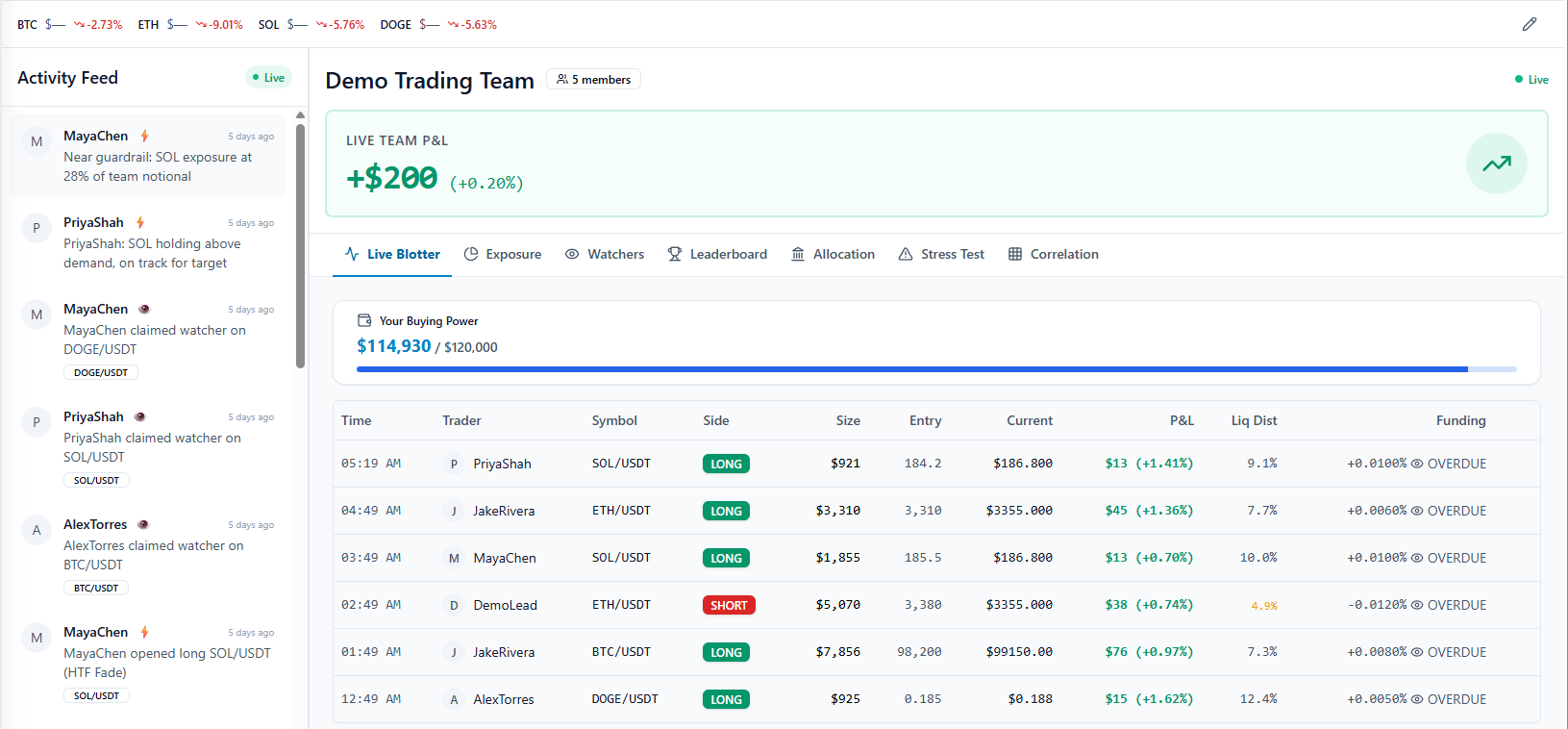
In the app: /team/pulse
How it fits the floor
Team Pulse sits inside The Trading Floor — the same sidebar tab that holds Team Pulse, the thesis → setup → execution pipeline, guardrails, allocations, and attribution. Retail journals bolt on a teams page; The Final Tape mirrors how prop desks actually operate.
Learn about the full Trading FloorExplore the other tabs
Theses
Research & conviction layer
Open Theses Tab 3Setups
Structured trade plans
Open Setups Tab 4Executions
Live team trading book
Open Executions Tab 5Guardrails
Team-wide risk enforcement
Open Guardrails Tab 6Allocations
Capital caps per trader
Open Allocations Tab 7Portfolios
Team capital accounts
Open Portfolios Tab 8Performance
Desk scorecard & attribution
Open Performance Tab 9Team
Roles & administration
Open TeamFrequently asked questions
Is Team Pulse the default Trading Floor view?
Yes. Opening The Trading Floor in the sidebar lands on Team Pulse at /team or /team/pulse — the live command center, not a static dashboard.
How often do blotter prices refresh?
Live marks refresh on roughly a five-second cadence with visual indicators when prices are stale or disconnected.
See Team Pulse on a live desk
Inspect the full Trading Floor on a populated demo team — every tab visible, read-only, no credit card.