The Trading Floor — Tab 6 of 9
Allocations
Capital caps per trader
Allocations express desk capital in R-multiples (1R = $1,000 by default). See each trader’s base cap, auto-suggested performance adjustments, effective cap, usage bar, and buying power — with rebalance history and dynamic rule previews.
What it covers
Allocations is part of the same Trading Floor sidebar — one desk context from pulse to planning to attribution, without switching tools.
- →Per-trader base cap and effective cap
- →Auto-suggested performance adjustments
- →Usage bars and buying power per trader
- →Allocation history (last 50 rebalances)
- →Dynamic rules builder for rule-based allocation
Key capabilities
- Manual override dialog for desk leads
- Preview weekly rebalance proposals
- Approve or reject allocation engine suggestions
- Export allocation report as CSV
What your desk gets
- Transparent capital distribution across the desk
- Performance-linked sizing without spreadsheet drift
- Historical record of every rebalance decision
- Buying power context at execute time
Example workflow
“Review weekly rebalance proposal → approve +0.5R for top performer → effective caps update → traders see new buying power on Pulse.”
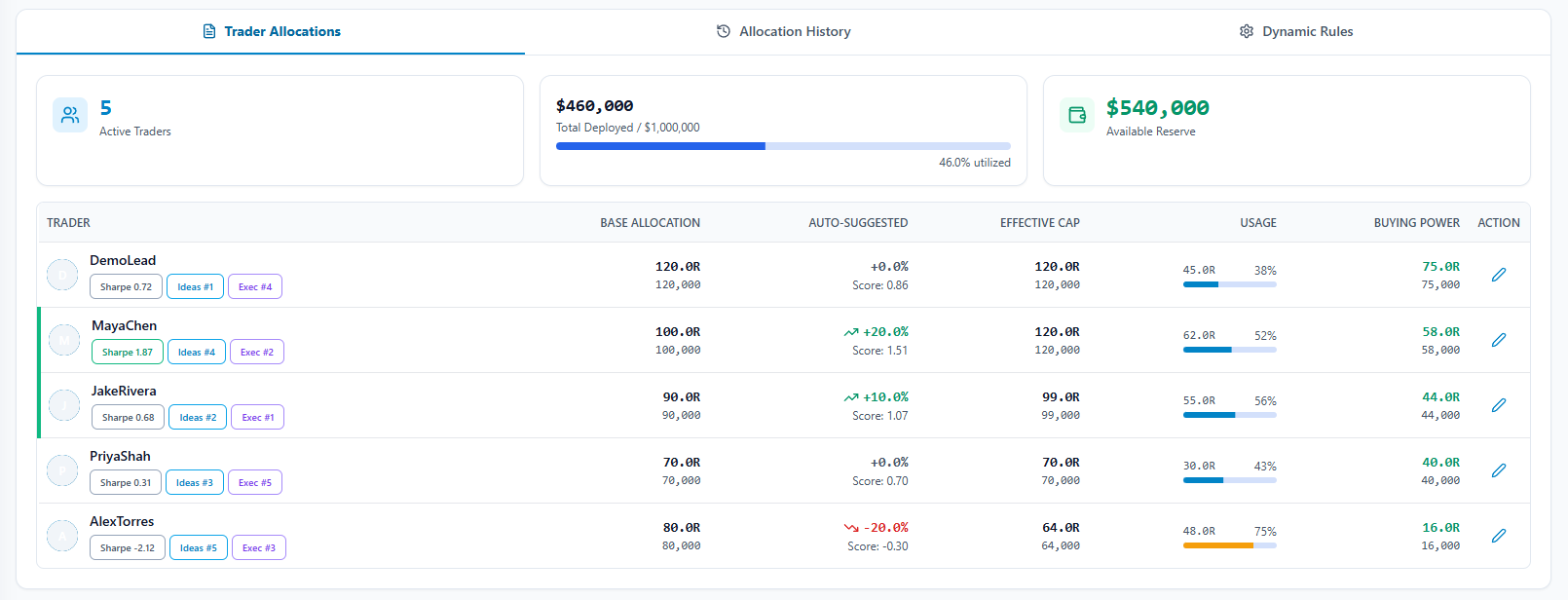
In the app: /team/allocations
How it fits the floor
Allocations sits inside The Trading Floor — the same sidebar tab that holds Team Pulse, the thesis → setup → execution pipeline, guardrails, allocations, and attribution. Retail journals bolt on a teams page; The Final Tape mirrors how prop desks actually operate.
Learn about the full Trading FloorExplore the other tabs
Team Pulse
Live desk command center
Open Team Pulse Tab 2Theses
Research & conviction layer
Open Theses Tab 3Setups
Structured trade plans
Open Setups Tab 4Executions
Live team trading book
Open Executions Tab 5Guardrails
Team-wide risk enforcement
Open Guardrails Tab 7Portfolios
Team capital accounts
Open Portfolios Tab 8Performance
Desk scorecard & attribution
Open Performance Tab 9Team
Roles & administration
Open TeamFrequently asked questions
What is an R-multiple in allocations?
R is the desk’s unit of risk capital. Allocations cap how many R each trader can deploy, independent of notional position size on any single trade.
How does this relate to Team Pulse allocation sub-tab?
Team Pulse shows a live preview of allocation state during the session. The Allocations tab is where caps are managed, history is reviewed, and rebalances are approved.
See Allocations on a live desk
Inspect the full Trading Floor on a populated demo team — every tab visible, read-only, no credit card.