Traders at 50–100 Trades a Week: Your Trading Blotter Needs Automation
Practical, trader-focused walkthrough with a copyable trading blotter template, a daily reconciliation checklist, and when to use forensic trade...

Traders at 50–100 Trades a Week: Your Trading Blotter Needs Automation
A trading blotter is a time-stamped record of every trade executed in an account, capturing what was bought or sold, when, at what price, and through which venue. Traders use it for three overlapping jobs: proving to regulators that a trade history is complete, catching execution mistakes before they compound, and calculating exactly where profit and loss actually came from. What follows covers the fields that matter, the integrations that keep the data clean, and a template you can build today.
TL;DR:
- Ensuring accurate timestamps, unique order IDs, and proper reconciliation daily prevents errors and maintains the integrity of trade records.
- Automation through broker APIs and structured trade reconstruction tools reduces manual errors, especially vital for high-frequency and algorithmic strategies.
- Different blotter types serve specific needs, with live versions focusing on real-time data and post-trade versions emphasizing completeness and review.
- Security measures such as encryption, access controls, and careful third-party platform selection protect sensitive trade data from leaks and misuse.
- Regularly reviewing and correcting common issues like missed fills, timezone mismatches, and fee miscalculations is key to maintaining reliable and compliant trade records.
Table of Contents
- What Goes Into a Trading Blotter
- How Trading Blotter Data Actually Gets Built
- Live, Post-Trade, Settlement, and Accounting Blotters
- Compliance, Attribution, and Risk: What a Blotter Is Actually For
- A Blotter Template You Can Build Today
- How The Final Tape Reconstructs Blotter-Grade Data
- Keeping Blotter Data Secure and Private
- Automation Tools for Advanced Blotter Management
- Common Blotter Problems and How to Fix Them
- Algorithmic Trading Has Made Blotters More Complex, Not Simpler
- What Actually Keeps a Blotter Reliable
- Turn Your Blotter Into a Forensic Audit, Not Just a Log
- Sources
What Goes Into a Trading Blotter
A blotter is only as useful as its weakest column. Miss a timestamp or mangle an order ID, and every downstream report built on that row becomes suspect.
The standard field set, drawn from how brokers and platforms structure their trade logs, looks like this:
| Field | Why it matters |
|---|---|
| Timestamp | Establishes sequence for reconstruction and audit |
| Instrument | Ties the trade to a specific security or contract |
| Side (buy/sell) | Defines direction of the position |
| Quantity | Sizes the trade for exposure and P&L math |
| Price | Basis for realized/unrealized calculations |
| Order ID / Execution ID | Links fills back to the original order |
| Execution venue | Shows where the trade cleared, relevant for best-execution review |
| Commissions/fees | Adjusts gross P&L to net |
| Realized/unrealized P&L | Tracks outcome per position |
| Allocation | Assigns fills across accounts or strategies |
| Status | Flags open, filled, partial, or canceled |
Trade blotters commonly include these exact columns because each one answers a specific question an auditor, risk manager, or trader will eventually ask.
Timestamp granularity deserves special attention. A blotter logged to the minute might look tidy, but it can’t prove sequence when two orders hit within the same 60 seconds, which is exactly the kind of gap regulators look for during a review.
When reading a blotter, sort by time first, then filter by instrument or account to isolate a single strategy’s behavior. Flag anything with a suspiciously round fill price or a commission that doesn’t match your broker’s schedule. Those are the rows worth a second look.
How Trading Blotter Data Actually Gets Built
Most traders assume their blotter populates itself. It doesn’t, not entirely, and the gaps are where errors sneak in.
Three sources feed a typical blotter today:
- Live feeds and broker auto-sync via FIX protocol or a broker’s API, which push fills in near real time.
- Broker CSV exports, downloaded manually and imported, a slower path with more room for formatting errors.
- Manual entry, still common for retail traders working across multiple platforms, and the riskiest source for typos and missed fills.
Modern platforms increasingly automate this recording directly through trading software rather than relying on end-of-day exports, which cuts down on the manual-entry risk considerably.
Reconciliation is the step that catches what automation misses. Compare fills against original orders, check that allocations across accounts sum correctly, and confirm settlement dates match what your custodian reports. A trade that looks filled in your blotter but unsettled at the clearinghouse is a red flag, not a rounding error.

Pro Tip: Never let your blotter’s timestamp format drift between sources. If your broker feed logs in UTC and your manual entries use local time, your sequence of events will be wrong exactly when you need it most, during a dispute or an audit.
Live, Post-Trade, Settlement, and Accounting Blotters
Not every blotter serves the same purpose, and using the wrong type for the job wastes time you don’t have mid-session.
- Live (or liveday) blotter: Used by execution desks and market makers who need to see open orders, partial fills, and pending cancellations in real time.
- Post-trade blotter: The end-of-day version traders review for journaling, mistake-tagging, and daily P&L confirmation.
- Settlement/allocation blotter: Used by operations teams to confirm trades cleared and client allocations landed correctly.
- Accounting-summarized blotter: A rolled-up view finance teams use for tax reporting and books-and-records purposes, usually stripped of execution-level detail.
Platforms like CME Group’s trading interface show how a live blotter’s UI differs from a post-trade view. The live version emphasizes speed and pending status; the post-trade version emphasizes completeness and searchability. Pick the blotter type that matches the decision you’re actually trying to make.
Compliance, Attribution, and Risk: What a Blotter Is Actually For
A blotter earns its place in your workflow through three practical jobs, not one.
- Compliance and audit defense. Regulators use trade logs to reconstruct activity and check for patterns like unusual concentrations of winning trades in specific accounts, or trades placed suspiciously close to news events. The SEC’s recordkeeping framework and FINRA’s broker-dealer guidance both treat detailed trade records as baseline evidence, and Investopedia notes that blotters routinely surface exactly this kind of anomaly.
- Performance attribution. Your P&L numbers are only as trustworthy as the blotter underneath them. Industry practice around performance attribution treats clean blotter data as the precondition for reliable strategy analysis. Get the fee column wrong, and your “profitable” strategy might actually be losing money after costs.
- Post-trade review. Sort by strategy, tag recurring mistakes (late entries, oversized positions, ignored stops), and build a short list of fixes ranked by dollar impact.
Risk teams pull the same data for a fourth purpose: aggregating exposure across positions, catching limit breaches, and flagging trades that haven’t settled when they should have. One unsettled block trade sitting quietly in a blotter can mean a real counterparty problem, not just a paperwork lag.
A Blotter Template You Can Build Today
You don’t need custom software to start. A spreadsheet with the right columns will get you most of the way there.
The minimal column set: timestamp, instrument, side, quantity, price, fees, order ID, and running P&L. Each earns its place because dropping any one of them breaks a downstream calculation. Skip the order ID, for instance, and you can’t tie a partial fill back to its parent order when reconciling.
For the export/import workflow, keep it simple: pull a CSV from your broker, confirm the timestamp column didn’t get reformatted by your spreadsheet software (a common Excel gotcha that silently strips seconds), and check that fee fields imported as numbers, not text.
Run a daily reconciliation checklist before you close the books on a session: does your fill count match your order count, does P&L tie to your account statement, do allocations add up, and is anything still marked pending that shouldn’t be? A post-trade review template can standardize this so you’re not rebuilding the checklist from memory every night.
How The Final Tape Reconstructs Blotter-Grade Data
Manual blotters break down exactly where forensic detail matters most: reconstructing what actually happened during a fast-moving trade, fill by fill.
Thefinaltape approaches this through structured trade reconstruction, rebuilding fills from broker and exchange messages into canonical rows that correct for slippage and timing artifacts a standard export would miss. That reconstructed dataset feeds an AI Council, seven specialist analysts plus a Chief Coaching Officer, who debate the trade from different angles rather than issuing a single automated verdict.
The output isn’t a vague summary. Traders get:
- A prioritized Kill List of behavioral errors, ranked by quantified dollar impact
- Clear attribution showing which setups, not just which trades, are driving results
- A root-cause breakdown rather than a surface-level “you sold too early” note
The practical difference from a spreadsheet blotter: instead of noticing you had a bad week, you learn that a specific entry pattern cost you $2,400 across eleven trades this month, and exactly what to change first. Explore the full trade review software approach to see how the reconstruction pipeline works end to end.
Keeping Blotter Data Secure and Private
A trading blotter is a financial record with real exposure if it leaks. It contains account numbers, position sizes, and enough pattern data to reveal a trader’s entire strategy to a competitor or bad actor.
Storage matters more than most traders assume. A blotter sitting in an unencrypted spreadsheet on a shared drive is a liability, not a convenience. At minimum, encrypt data at rest, use a password manager rather than memorable passwords for any platform holding trade history, and avoid emailing blotter exports as unprotected attachments.
Access control is the second layer. On a trading desk, not everyone needs to see every account’s blotter. Segment access by role, restrict who can export raw data, and log who pulled what and when. This isn’t paranoia, it’s the same principle FINRA applies to broker-dealer recordkeeping: the record has to be both preserved and controlled.
Third-party tools introduce their own exposure. Before connecting a broker API or uploading a CSV to any analytics platform, check how that provider handles data retention, whether they sell or share trade data, and whether the connection uses read-only permissions where possible. A platform that only needs read access to your fills has no reason to request trade-execution rights.
Cloud-based journals and analytics tools add convenience, but they also mean your trade history lives on someone else’s servers. Look for providers with clear data-deletion policies and, ideally, SOC 2 or equivalent security attestations before trusting them with a full trading history you can’t easily reconstruct if it’s compromised.
Automation Tools for Advanced Blotter Management
Spreadsheets work until they don’t. The breaking point usually arrives around 50 to 100 trades a week, when manual entry starts eating more time than the analysis it’s supposed to support.
Automated platforms solve this by pulling fills directly from broker APIs or FIX feeds, timestamping them consistently, and applying tagging rules automatically instead of by hand. That alone removes the single biggest source of blotter error: human transcription.
Beyond basic automation, more advanced tools add analytics layers on top of the raw log. Performance attribution modules break P&L down by setup, time of day, or instrument. Simulation tools, Monte Carlo runs or “what if” scenario testing, let you see how a strategy would have performed under different position sizing without risking real capital. Exit optimization modules compare your actual exits against theoretically better ones, quantifying the gap in dollars rather than vague feedback.
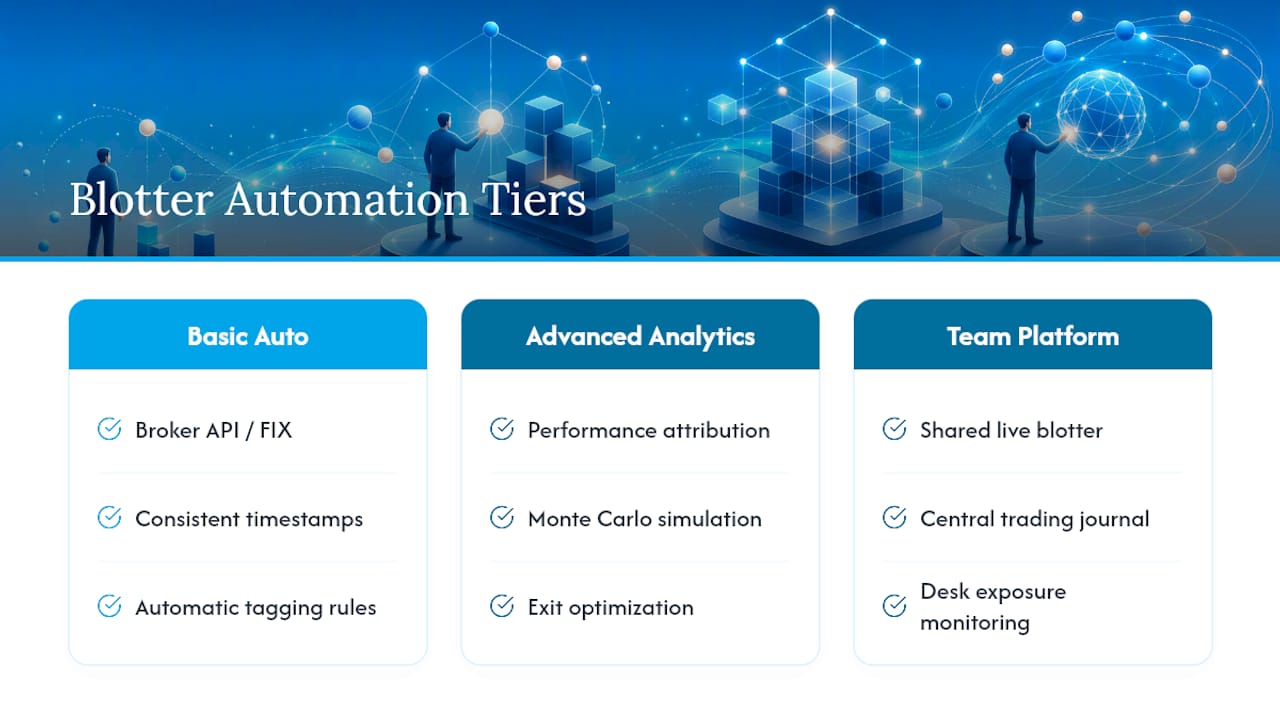
Team-oriented platforms go further, offering a shared live blotter workspace where a desk can monitor exposure across multiple traders in real time rather than reconciling separate spreadsheets at day’s end. Thefinaltape’s trading journal and analytics solutions build this kind of layered analysis directly on top of reconstructed trade data, so the automation isn’t just faster data entry, it’s faster insight.
The right tool depends on volume and complexity. A trader placing five trades a week may never need more than a well-built spreadsheet. A desk running dozens of positions across multiple strategies needs automation just to keep the blotter accurate, let alone useful.
Common Blotter Problems and How to Fix Them
Every trader who’s kept a blotter for more than a month has hit the same handful of problems.
Missed fills top the list, usually from partial executions that never made it into the manual entry because the trader only recorded the final position. The fix is procedural: reconcile fill count against order count daily, not weekly, so gaps surface while you can still remember what happened.
Timezone mismatches cause quiet damage. A broker feed in UTC combined with manually entered trades in local time will scramble your sequence of events, which matters enormously if you’re ever reconstructing a specific session for a dispute or a strategy review. Standardize on one timezone across every data source, no exceptions.
Duplicate entries happen when a CSV import runs twice or when a manual entry gets added on top of an auto-synced fill. Build a simple rule: order ID is the deduplication key, and any row without a unique order ID gets flagged for manual review before it’s trusted.
Fee and commission errors are the sneakiest, because they don’t break anything visibly, they just quietly distort net P&L. A blotter that tracks gross P&L accurately but drops or miscalculates fees will make a losing strategy look marginally profitable, which is worse than an obvious error because nobody catches it.
The underlying fix for most of these is the same: reconcile daily, not periodically. A five-minute check against your broker statement catches problems while they’re still small.
Algorithmic Trading Has Made Blotters More Complex, Not Simpler
High-frequency and algorithmic strategies generate order volumes that make a single blotter row per “trade” almost meaningless. One algorithmic decision can produce dozens of child orders, partial fills, and cancel-replace messages within milliseconds, and each of those needs its own row to reconstruct what actually happened.
This changes what “accurate” means for a blotter. Sub-second timestamp precision stops being a nice-to-have and becomes the only way to prove sequence when multiple orders route within the same second. A blotter logged to whole seconds is functionally useless for reviewing algo behavior, because it can’t distinguish which of ten orders filled first.
Reporting requirements scale with this complexity too. A desk running algorithmic strategies needs blotters that can aggregate thousands of micro-fills back into parent order performance, otherwise the attribution work described earlier becomes impossible; you can’t calculate a strategy’s real slippage if you can’t see every child fill that built the position.
This is also where trade reconstruction tools earn their keep over spreadsheets. Rebuilding a high-frequency session from raw exchange and broker messages into readable, attributable rows isn’t something a manual process handles well at scale, and it’s exactly the gap that structured reconstruction is built to close.
What Actually Keeps a Blotter Reliable
Most advice on trading records focuses on formatting: which columns, which software, which export button to click. The formatting matters less than three habits most traders skip.
Timestamp accuracy comes first, not because it’s glamorous, but because every other calculation, slippage, sequencing, attribution, depends on it being right. Second is automating imports wherever possible; manual entry is where good intentions die under time pressure. Third, and most neglected, is treating daily reconciliation as non-negotiable rather than something you’ll “get to” on a slow day.
If you do nothing else this week, pick one habit: reconcile your fill count against your order count at the close of every session, for seven straight days. It sounds trivial. It’s the single fastest way to find out whether your blotter is actually telling you the truth.
— Docze
Turn Your Blotter Into a Forensic Audit, Not Just a Log
A spreadsheet blotter tells you what happened. It doesn’t tell you why you keep making the same costly mistake repeatedly, and that gap is where Thefinaltape earns its place over a manual log.
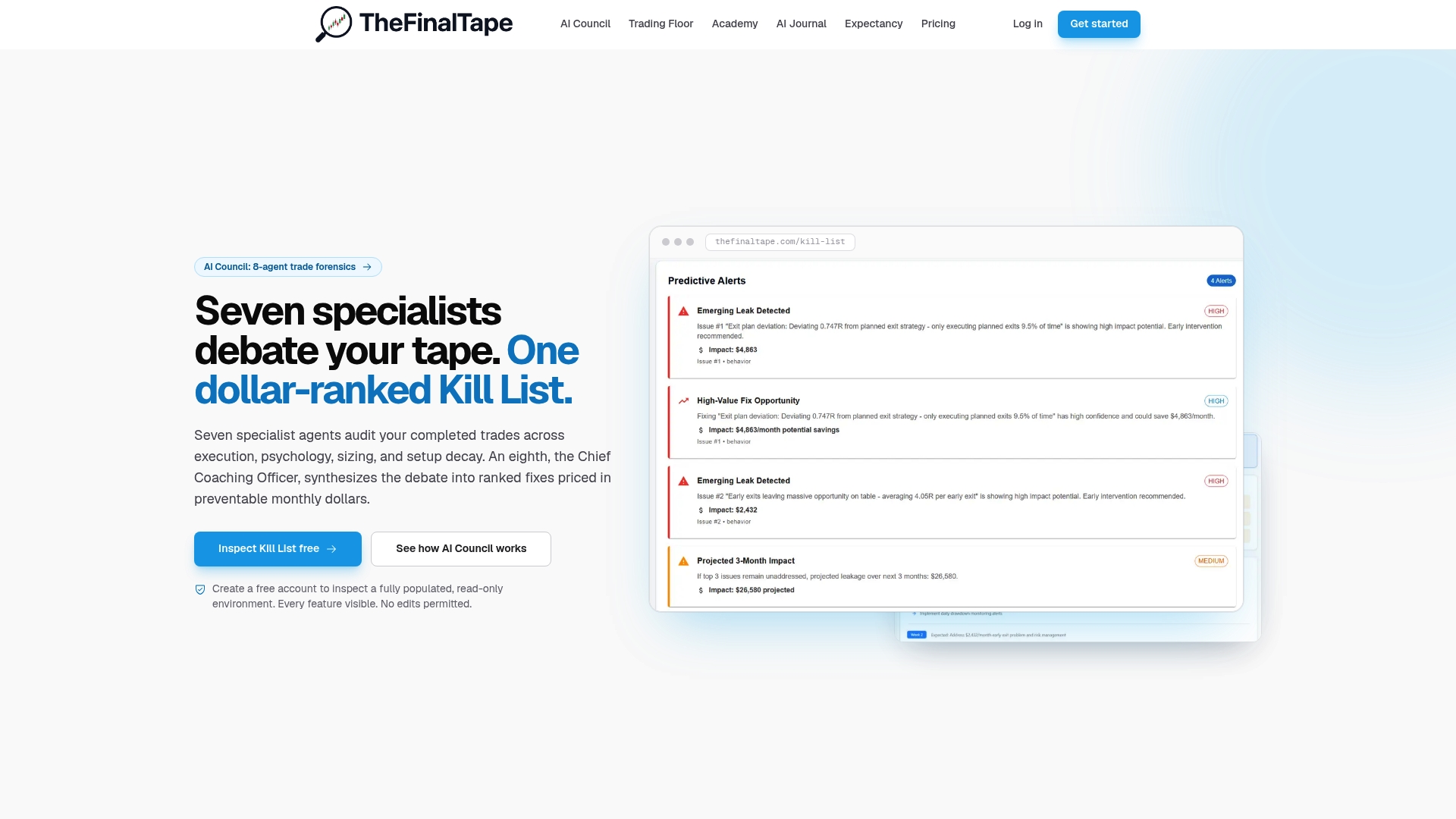
Instead of scrolling rows looking for patterns yourself, Thefinaltape’s AI Council reconstructs your fills into a clean dataset and runs seven specialist analysts against it, debating root causes the way a real trading desk review would, then hands you a prioritized Kill List with dollar figures attached to each behavioral error. That’s the difference between reviewing your own blotter and having it audited by a system built specifically to catch what you’re too close to see. Explore the full trading journal and analytics platform and see what a reconstructed trade history reveals about your own execution that a spreadsheet never will.
Sources
The SEC’s Division of Trading and Markets sets the regulatory baseline for trade recordkeeping. FINRA governs broker-dealer conduct and reconciliation standards. Investopedia provides the standard industry definition, and Databento documents how data hygiene underpins reliable performance attribution.
- Understanding blotters: Key uses, how they work, and examples — Investopedia
- Performance attribution and data hygiene — Databento
- SEC Division of Trading and Markets — Form ATS and related information
- FINRA — Financial Industry Regulatory Authority
Recommended
Stop reviewing from memory
Run compliance scoring, tag ranking, and Kill List rules on every trade — not once a month when the account feels off.